

AC Unit for Server Room Cooling: Protecting Your Data in 2026
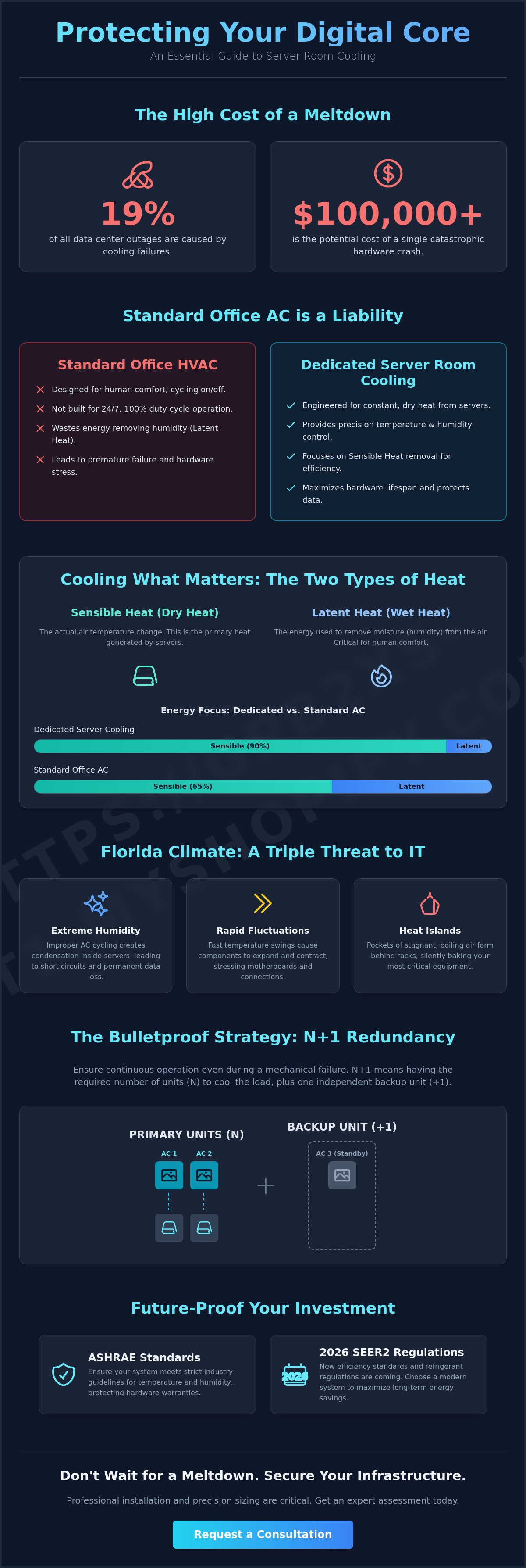
Did you know that cooling failures cause 19% of all data center outages? In the intense Sarasota climate, a thermal malfunction can lead to a catastrophic crash costing over $100,000 in lost productivity and hardware damage. You need more than a standard ventilation setup to protect your infrastructure. Selecting the right ac unit for server room cooling is about building a dependable sanctuary for your data. It's about ensuring your business stays operational even when the Florida heat is at its peak.
We understand the stress of managing rising rack densities while trying to keep energy costs in check. You deserve a cooling solution that provides total peace of mind through precision temperature and humidity control. This guide will show you how to navigate the 2026 refrigerant regulations and choose a system that meets strict ASHRAE standards. You'll learn how professional installation and N+1 redundancy can prevent downtime, protect your hardware, and create a high-performance environment that lasts.
Key Takeaways
- Understand why standard office HVAC fails to handle the constant, dry heat generated by servers and why a dedicated system is mandatory.
- Compare ductless mini-splits and portable systems to identify the most reliable ac unit for server room cooling for your specific facility.
- Learn how to apply the N+1 redundancy rule to ensure your data remains protected even during a mechanical failure.
- Discover how 2026 SEER2 standards and new refrigerant regulations will impact your equipment choices and long-term energy savings.
- Identify the critical steps for professional installation and precision sizing to prevent catastrophic hardware failure in the Florida climate.
Why Your Server Room Needs a Dedicated AC Unit
Your server room is the heart of your business operations. Unlike a standard office space, this environment generates intense, dry heat every second of the day. Most building managers make the mistake of assuming the central HVAC system can handle this load. It can't. Standard systems are designed for human comfort, meaning they cycle on and off based on the needs of people who leave at 5 PM. Your servers never leave. They require a specialized ac unit for server room cooling that is built for a 100% duty cycle, ensuring that hardware longevity isn't sacrificed for a few dollars in initial savings.
When residential or standard commercial systems are forced to run constantly, they fail prematurely. These units aren't engineered to manage the "sensible heat" loads found in high-density rack environments. A single hour of cooling failure can be catastrophic. According to industry data, over half of organizations report that a significant outage costs more than $100,000. When you consider that cooling issues are responsible for 19% of all data center outages, the investment in a dedicated system becomes a matter of business survival rather than a luxury.
Beyond environmental controls, ensuring your hardware is properly maintained is equally vital; you can explore Managed IT and On-Site Technical Support Fees to see how professional support can further minimize the risk of expensive downtime.
The Difference Between Sensible and Latent Heat
To understand why your equipment is at risk, you must understand the two types of cooling. Sensible heat refers to the actual drop in air temperature. Latent heat refers to the energy used to remove moisture from the air. Humans need a balance of both to feel comfortable, but servers only care about sensible heat. They produce a high volume of dry, "sensible" heat that must be removed immediately.
Standard air conditioners spend a large portion of their energy on dehumidification. In a technical environment, this is inefficient. If you use a standard comfort-based system, it will waste energy over-dehumidifying the room while struggling to keep the hardware cool. Precision Data center environmental controls are designed with a high sensible-to-total cooling ratio. This ensures that every bit of energy you pay for is used to protect your processors and motherboards from thermal stress.
Florida Climate Challenges for IT Infrastructure
In Sarasota, the climate adds an extra layer of danger. Our extreme humidity is a silent killer for sensitive electronics. When an improperly sized ac unit for server room cooling cycles too frequently, it can lead to rapid temperature swings. These fluctuations cause condensation to form inside the server chassis. Moisture on a motherboard leads to immediate short-circuiting and permanent data loss.
Small server closets are particularly vulnerable to "heat islands." These are localized pockets of stagnant, boiling air that form behind server racks. Without a dedicated system to provide high-velocity, targeted airflow, these heat islands will bake your equipment even if the rest of the building feels cool. You need a solution that recognizes the unique atmospheric pressure and moisture levels of the Florida coast to keep your digital sanctuary safe.
Types of AC Units for Server Room Cooling
Choosing the right hardware is the first step toward securing your digital assets. Not every system is capable of the high-performance demands of a modern technical environment. You need a solution that balances power with surgical precision. Selecting the ideal ac unit for server room cooling requires an understanding of how different systems handle constant thermal loads and localized heat spikes.
While some businesses rely on whatever cooling is already in the building, high-density environments demand dedicated equipment. For small to mid-sized server closets, ductless mini-splits are the undisputed gold standard. For larger facilities, Computer Room Air Conditioning (CRAC) units provide industrial-grade thermal management. Each has a specific role in your redundancy strategy.
Ductless Mini-Splits: Efficiency and Precision
Ductless mini-splits are the most popular choice for dedicated server room cooling today. Industry leaders like Daikin and Mitsubishi Electric have engineered these systems to operate independently from the main building HVAC. This independence is vital. It ensures your servers stay cool even when the rest of the office shuts down its air conditioning for the night or weekend.
These systems utilize variable refrigerant flow (VRF) technology. Instead of a simple "on or off" cycle, the compressor adjusts its speed to match the exact thermal load of the room. This prevents the dangerous temperature fluctuations that can stress sensitive electronics. If you are looking to build a resilient infrastructure, exploring commercial HVAC installation for a dedicated mini-split is a smart move for long-term reliability.
Portable Spot Coolers: When to Use Them
Portable AC units serve a specific, narrow purpose: emergency backup. When a primary cooling system fails, a portable spot cooler can neutralize a thermal crisis before your hardware shuts down. They are easy to deploy and provide immediate relief to specific "hot spots" within a rack.
However, portables are rarely a permanent solution. They come with significant limitations that can introduce new risks to your server room:
- Exhaust Requirements: These units must vent hot air through a ceiling plenum or a window, which can be difficult in internal rooms.
- Condensate Management: Most portables collect water in a manual tank. If the tank isn't emptied, the unit shuts off, or worse, it could leak near your equipment.
- Efficiency Gaps: Portables are significantly less energy-efficient than permanent installations, leading to higher utility costs over time.
Think of a portable unit as a band-aid. It stops the bleeding during a failure, but it doesn't provide the long-term security of a professionally installed, precision-engineered system. For a permanent sanctuary for your data, the investment in a dedicated mini-split or CRAC unit pays for itself through lower energy bills and zero downtime.
Portable vs. Dedicated Systems: The Real Cost of Cooling
When a thermal emergency strikes, a portable unit seems like a quick fix. However, the initial price tag is deceptive. You must look at the Total Cost of Ownership (TCO) over a five-year horizon to see the true financial impact. While a dedicated ac unit for server room cooling requires a higher upfront investment, it significantly outpaces portable alternatives in efficiency and reliability. Cooling infrastructure accounts for approximately 30-40% of a data center's total energy consumption. Choosing a low-efficiency portable unit can lead to a massive spike in your monthly utility bills that quickly exceeds the cost of a permanent installation.
Operational logistics also favor dedicated systems. In our humid Sarasota climate, moisture is a constant battle. Portable units often rely on internal tanks that require manual emptying. If your IT staff isn't there at 2 AM when the tank hits capacity, the unit shuts down. This leaves your racks to bake in stagnant air. Dedicated systems use permanent drainage lines and condensate pumps. This eliminates the risk of human error or overflow. Additionally, noise levels from portable compressors can be disruptive in small IT closets that share walls with executive offices or conference rooms.
The Hidden Costs of 'Cheap' Portables
Consumer-grade portable units are not built for a 100% duty cycle. Running these machines 24/7/365 leads to frequent compressor failures. They lack the industrial components found in precision cooling hardware. Another critical vulnerability is the "restart" problem. Sarasota experiences frequent power flickers during summer storms. Many portable units do not have an auto-restart feature that returns them to their previous settings after a surge. If the power blips, the unit stays off. Your servers continue to run, and temperatures can rise 8-12°C in just 15-30 minutes. This lack of remote monitoring and alarm capabilities creates a massive blind spot in your disaster recovery plan.
ROI of a Professional Installation
Investing in a professional ductless mini-split system provides a measurable return on investment through improved Power Usage Effectiveness (PUE). By 2026, SEER2 efficiency standards have become the baseline for commercial operations. These high-efficiency systems utilize the latest low-GWP refrigerants like R-32 or R-454B. These modern systems reduce energy waste and may qualify your business for specific tax incentives aimed at high-efficiency commercial HVAC upgrades.
The most significant ROI, however, is hardware longevity. Consistent, stable environments prevent the thermal expansion and contraction that leads to "chip creep" and premature component failure. By maintaining a steady ASHRAE-recommended inlet temperature of 64.4-80.6°F, you extend the life of your expensive server assets. You aren't just buying an air conditioner; you are buying insurance against the $100,000+ cost of a significant data center outage.
Sizing and Redundancy: Building a BulletProof Strategy
Precision is the only difference between a stable digital environment and a thermal disaster. When you select an ac unit for server room cooling, you aren't just buying a machine; you are engineering a safety net. Proper sizing and a rigorous redundancy plan are the twin pillars of this strategy. If your cooling capacity is off by even a small margin, your hardware pays the price through shortened lifespans or sudden shutdowns.
Airflow management is equally critical. We recommend implementing hot-aisle or cold-aisle containment to prevent the mixing of air streams. By directing cold air specifically to the server intakes and exhausting hot air directly to the return, you maximize the efficiency of your equipment. For total oversight, integrate your cooling system with a Building Management System (BMS). This allows for real-time monitoring and instant alerts before a minor temperature creep becomes a full-blown emergency.
BTU Calculation for IT Loads
You cannot guess the cooling needs of a server room. The calculation must be based on the actual heat output of your hardware. A reliable starting point is the wattage formula: Total Watts x 3.41 = Required BTU/hr. This gives you the base sensible heat load. However, a professional assessment goes further. You must also account for the square footage of the room, the heat generated by lighting, and the occasional presence of personnel.
Oversizing a system is a common and dangerous mistake. If an ac unit for server room cooling is too large for the space, it will "short cycle." This means the unit turns on and off too rapidly. Short cycling prevents the system from properly regulating the environment and puts immense strain on the compressor. In our Sarasota climate, a short-cycling unit fails to manage moisture, leading to the humidity risks we discussed earlier. Precision sizing ensures the system runs long enough to maintain a stable, dry sanctuary for your racks.
Planning for Failure: N+1 and N+2 Redundancy
In the world of critical infrastructure, one is none. The N+1 redundancy rule is the industry standard for protecting your data. "N" represents the number of cooling units required to handle your total heat load. The "+1" is your backup. If one unit requires maintenance or suffers a mechanical failure, the backup takes over immediately. This is vital because a single fan failure can cause temperatures to rise 8, 12°C in as little as 15 minutes.
To ensure your hardware lasts, we utilize lead-lag controllers. These devices rotate the workload between your primary and backup units. This prevents one machine from wearing out while the other sits idle. Automatic failover protocols are the final piece of the puzzle. They ensure that if a thermal runaway begins, your backup systems engage without requiring human intervention. If you are ready to secure your facility, schedule a commercial HVAC installation to build a redundant system that never sleeps.
Expert Server Room Cooling Installation in Sarasota
Local expertise isn't just a buzzword; it's a technical requirement in Southwest Florida. The combination of salt air, high humidity, and extreme heat creates a hostile environment for any mechanical system. At BulletProof Air, we approach every commercial project with the mindset of a first responder. We know that your data is your most valuable asset. Our team specializes in the precision deployment of the right ac unit for server room cooling, ensuring that your infrastructure remains a protected sanctuary regardless of the conditions outside. We understand that standard cooling isn't enough when your business continuity is on the line.
Our approach centers on durability and resilience. We don't just install equipment; we build systems designed to withstand the unique stresses of the Sarasota climate. By choosing a partner with deep regional roots, you ensure that your cooling strategy accounts for local power grid patterns and atmospheric challenges that outsiders often overlook. We position ourselves as your definitive resolution for thermal management, providing the skill and speed necessary to protect your hardware 24/7/365.
Precision Installation Services
A successful installation goes beyond just bolting a unit to a wall. It requires a deep understanding of airflow dynamics and moisture control. We provide custom ductwork and specialized mounting solutions for ductless mini-splits to ensure cold air reaches your IT racks without obstruction. Proper condensate management is our highest priority. In a server room, a single leak can be as damaging as a fire. We install redundant drainage lines and high-capacity condensate pumps to prevent water damage to your sensitive electronics. This meticulous attention to detail is what sets our Commercial HVAC Services apart from general contractors who lack technical specialization.
24/7 Emergency Support and Maintenance
Thermal emergencies don't wait for business hours. When a cooling failure threatens your uptime, you need a partner who responds with speed and skill. Our "First Responder" philosophy means we treat every server room outage as a critical priority. We are ready to restore your environment and prevent catastrophic data loss. However, the best way to handle an emergency is to prevent it entirely. Our custom maintenance plans include quarterly precision tune-ups. We check refrigerant levels, inspect electrical connections, and clear drainage lines to ensure 100% uptime. Don't leave your hardware at risk. Contact us today for a Commercial AC Installation estimate and secure the future of your business operations.
Secure Your Infrastructure Against the Florida Heat
Your server room is too critical to leave to chance or an underpowered cooling system. We've explored how a dedicated ac unit for server room cooling provides the precision needed to prevent catastrophic downtime and hardware failure. By prioritizing N+1 redundancy and choosing high-efficiency mini-splits, you transform a vulnerable IT closet into a resilient digital sanctuary. Every degree matters when your business continuity is on the line.
In addition to climate control, ensuring your facility meets high standards for structural integrity and fire prevention is vital for total risk mitigation. To explore expert solutions in these areas, learn more about MESCH Isolierung & Brandschutz GmbH, a leader in technical insulation and fire safety.
BulletProof Air has served the Sarasota and Bradenton communities for over a decade. We specialize in precision cooling solutions from industry leaders like Daikin and Mitsubishi. Whether you need a new installation or 24/7 emergency commercial service to handle a sudden failure, our team is ready to respond with speed and skill. Don't wait for a thermal alarm to take action. You deserve the peace of mind that comes with a professionally engineered environment. Take the first step toward a more reliable facility today.
Secure Your Servers with a BulletProof Cooling Estimate
Frequently Asked Questions
Can I use a standard window AC unit for my server room?
Using a standard window AC unit for a server room is not recommended for critical infrastructure. These systems are designed for seasonal human comfort rather than the 24/7/365 sensible heat loads produced by IT equipment. They lack the precision controls and industrial-grade compressors necessary to maintain a stable environment. Relying on a window unit increases the risk of a catastrophic failure during a Sarasota heatwave.
What is the ideal temperature for a server room in 2026?
The ideal server inlet temperature recommended by ASHRAE TC 9.9 is 64.4 to 80.6°F (18 to 27°C). While the allowable range extends up to 89.6°F, operating within the recommended window ensures maximum hardware longevity and prevents thermal throttling. Maintaining this precise temperature range is the primary job of a dedicated ac unit for server room cooling in high-density environments.
How many BTUs do I need for a small server closet?
To find the required BTUs, use the formula: Total Watts x 3.41 = BTU/hr. For example, a small closet with 2,000 watts of equipment needs approximately 6,820 BTUs just for the hardware. You must also account for room square footage and lighting heat. We recommend a professional load calculation to ensure your system is perfectly sized for your specific rack density.
What happens to servers if the humidity is too high or too low?
Servers face different threats depending on moisture levels. Humidity above 80% can lead to condensation, causing immediate short-circuiting and hardware destruction. Conversely, humidity below 20% increases the risk of electrostatic discharge, which can fry sensitive components. Your cooling system should maintain a steady relative humidity between 20-80% to ensure a safe, non-condensing environment for your data.
Is a ductless mini-split better than a portable AC for server cooling?
A ductless mini-split is significantly better than a portable unit for permanent server cooling. Mini-splits offer higher energy efficiency, permanent drainage lines, and more reliable compressors built for continuous operation. Portable units are useful as a temporary emergency band-aid but lack the automation and monitoring features needed to protect your infrastructure over the long term.
How often should I service my server room AC unit?
You should schedule precision maintenance for your server room cooling system at least four times per year. Because these units run 24/7/365, they experience four times the wear and tear of a standard residential AC. Quarterly service allows technicians to clean coils, check refrigerant levels, and inspect electrical components before a minor issue causes a total system shutdown.
What is N+1 redundancy in cooling?
N+1 redundancy means having one more cooling unit than is strictly necessary to handle the room's total heat load. If your equipment requires two units to stay cool, an N+1 strategy involves installing three. This ensures that if one unit fails or requires service, the remaining units can maintain a safe temperature without any interruption to your operations.
Do I need a special permit for commercial AC installation in Sarasota?
Commercial AC installations in Sarasota and Bradenton typically require a building permit to ensure the work meets Florida Building Code standards. This process verifies that the electrical and structural components of the installation are safe. Working with a professional installer ensures that all regulatory requirements are met and that your system is legal and fully insured.
If you would like maintenance or repair assistance with your Florida Air Conditioner, contact BulletProof Air Or call: 941.599.9999 for more information about how we can help.